The essential step in web design and UX/UI is to design an effective user experience
by designing what will be developed next.
Optimizing this user experience requires a bit of strategy : Who are your targets? What is the added value of your services? How can you present your offer clearly, quickly and visually to your visitors?
The fundamentals of conversion-oriented web design
The credibility and authority of your brand also depend on visuals, the user experience, the fluidity of navigation and the clarity of the message. Good design isn't just about aesthetics: it guides, reassures and turns your visitors into prospects. Without highlighting your solutions through an intuitive experience and consistent design, your visitors risk missing your value proposition.
Your site needs to clearly explain what you do, why you do it better, and inspire them to take action.
Why web design is essential before site development
Before you even start developing a website, the web design stage is essential to lay a solid foundation, both strategically and functionally. Designing the UX/UI upstream enables us to structure content, define a clear hierarchy of information and anticipate user paths to ensure fluid, intuitive navigation.
This design phase also helps to align design with business objectives (lead generation, conversion, brand awareness) while avoiding costly round-trips during the development phase.
By validating zoning, wireframes and mock-ups upstream, we ensure the overall coherence of the project and optimize the site's performance as soon as it goes online. A well thought-out web design is therefore not just a creative step: it's a key lever for creating an effective, high-performance, conversion-oriented website.
Design levers that really impact conversion
- Visual hierarchy: what the user sees first must be strategic (title, CTA, value).
- Call-to-action (CTA): visible, clear, actionable ("Request a quote" vs. "Learn more")
- Social proof: testimonials, customer logos, case studies
- Reduced friction: fewer fields, simple navigation, fast loading times
- Visual consistency: colors, typography, components = trust
- Responsive: having a site that bugs or whose responsive isn't fluid doesn't give visitors confidence, and can even become a source of frustration to the point where they decide to leave the site.
Simple web design mistakes to avoid
- A visually overloaded site
- A vague value proposition
- Too many possible actions (no focus)
- Pretty but not strategic design
- Confusing navigation
By the way, did you know that for landing pages that really convert, it's highly advisable to have a header and footer that are different from the rest of your site? The idea is to create and design them specifically for your landing pages, so that they don't include all your usual menus and links, and so force your users to stay on your page and take action by submitting your form.
From zoning to wireframe to mock-ups
Our method for every stage of your web design
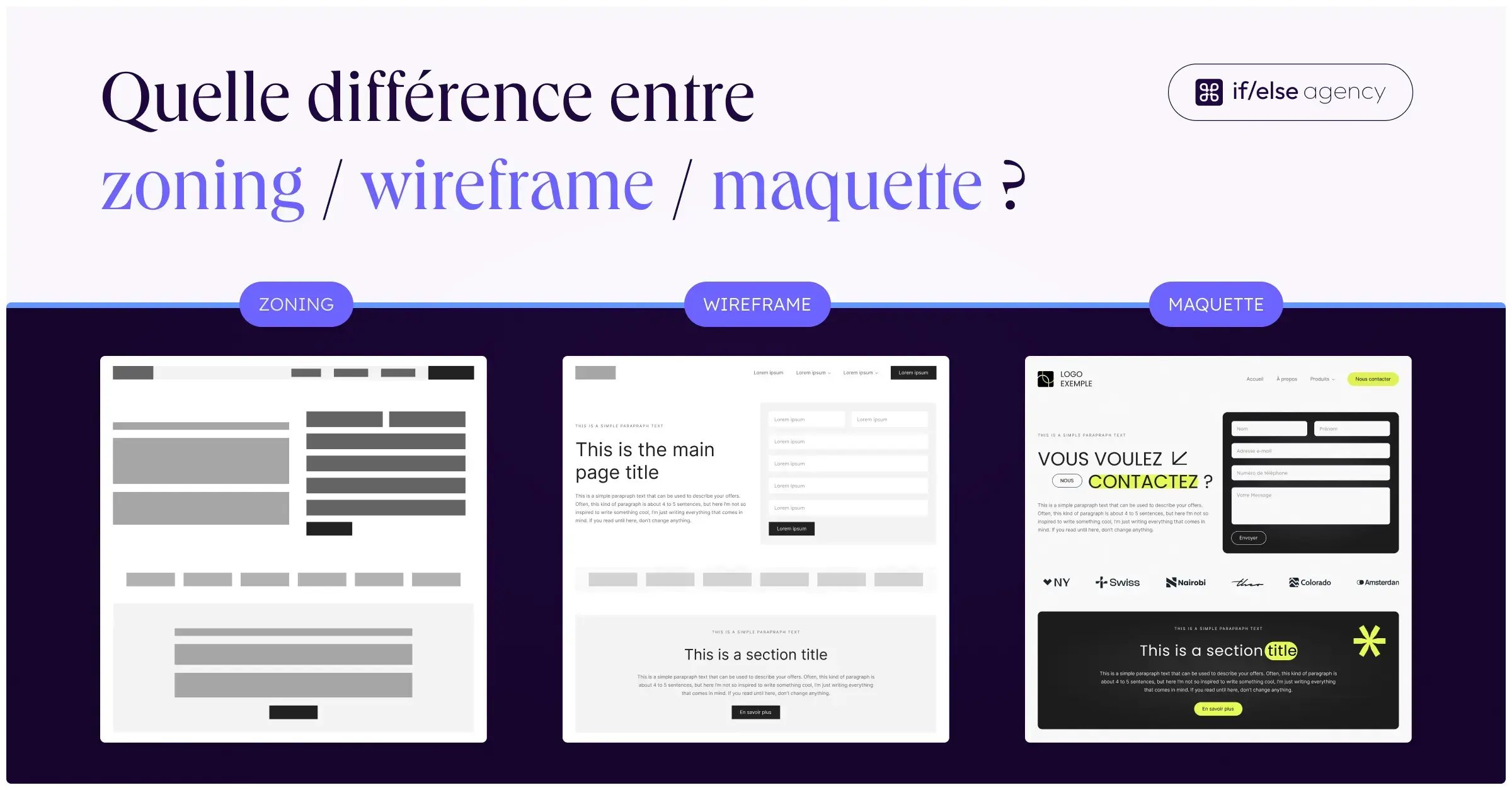
Web design isn't just about creating pretty mock-ups. Before moving on to the final visual design for web development, there are 2 essential steps:
- Establish a Zoning per template: zoning defines the overall structure of each page: it specifies the different content zones ("services" section, "pricing", "testimonials", "contact"...) and allows you to visualize what each part of the template will display.
- Create a wireframe for each template: once the zoning has been validated, the wireframe specifies the exact elements contained in each zone: titles, texts, buttons, carousels, videos or maps. This step enables us to anticipate the hierarchy of information and optimize the user experience.
Only after joint validation of the zoning and wireframes do our expert designers move on to the web design of the UX/UI mock-ups for a design aligned with your business objectives, ready to be developed without unpleasant surprises.
Do you need to improve the user experience of your future website? The designers at if/else agency would be happy to discuss this with you !