Since mid-October, HubSpot has offered Nurture Agent in beta: an AI agent that rewrites each of your nurture emails for the contact receiving it, at the moment of send. On paper, that's the end of "Hi {first name}" blasted to 5,000 people who have nothing in common.
In reality, HubSpot Nurture Agent doesn't fix anything. It amplifies what's already there. Plug it into a shaky nurture flow or a messy CRM and it will send wrong emails faster, then bill you for each one.
Should you turn it on? Yes, but carefully, and not everywhere. Here are the 5 questions to ask before you flip the switch 👇🏼
HubSpot Nurture Agent: what it actually does
The agent was one of the announcements at HubSpot's Unbound conference, covered by MarTech on October 16. According to HubSpot's documentation, last updated October 13, 2026, Nurture Agent is available on Marketing Hub Professional and Enterprise, uses HubSpot Credits and is still in beta. It only works on published automated emails, and not on transactional ones.
In practice, the agent rewrites four parts of the email:
- the subject line
- the preview text
- the email body
- the CTA text
To personalize, it uses the CRM properties you select, the contact's activity and, according to HubSpot, live web research run at the moment of send. By default, only 50% of recipients get the rewritten version. Everyone else gets the original email.
That last point is the most interesting one, and the most overlooked. We'll come back to it in question 5.
1. Is your nurture email worth personalizing?
According to HubSpot's documentation, the agent only rewrites the email's text (subject line, preview text, body, CTA). If your sequence pitches a demo to someone who just downloaded their first guide, no amount of clever copy will fix the timing.
A typical case: a 5-email nurture where clicks collapse on email three. The copy is rarely the culprit. The flow jumps a stage, going straight from educational content to "book a call" with nothing in between. Personalizing that email means paying to dress up a premature ask.
New Breed, in a guide published on October 16, recommends starting with an established email. We'd go further: start with an email that already performs reasonably well, in a sequence whose logic holds up. If you're not sure, rework the structure first with our cross-channel nurturing strategy.
2. Is your CRM data clean enough for AI?
Nurture Agent personalizes from the properties you pick: persona, lifecycle stage, industry, company size, associated deals. If those fields are empty or outdated, the agent will write confidently from bad information.
Picture a contact whose record still shows their previous employer. They get an email about the challenges of an industry they left a year ago. A generic email would have left them indifferent. This one proves you don't know them.
Two simple rules:
- Fewer properties, but reliable ones: three to five well-filled fields beat fifteen half-empty ones
- Keep web research in check: the agent supplements your data with online research at send time, which looks a lot like enrichment. Make sure your privacy policy covers it, as with any GDPR-compliant data enrichment
3. What should never be rewritten?
Some parts of your emails shouldn't change, whoever the recipient is: offer terms, prices, event dates, legal notices. HubSpot provides a "Lock text" option to freeze an entire module. Use it.
Watch your smart content too. HubSpot's documentation says the agent may rewrite it just like the rest of the text. If you carefully built variations by persona, the agent can still edit them.
HubSpot also recommends setting up brand voice before you turn the agent on. Before going live, the tool generates previews for three contacts, up to ten, with a Compare view that highlights additions and removals and explains each change. Read all of them. It's your only review before the agent writes on its own.
4. How much will Nurture Agent cost you?
According to HubSpot's Product & Services Catalog, personalizing one email for one contact costs 10 credits. At the pay-as-you-go rate listed in the same catalog ($0.01 per credit), that's roughly $0.10 per personalized email.
Sounds cheap. Let's run the numbers on an example setup: a 6-email workflow with 2,000 new contacts enrolling each month. That's 12,000 sends. At the default 50% setting, 6,000 emails get personalized, which means 60,000 credits a month.
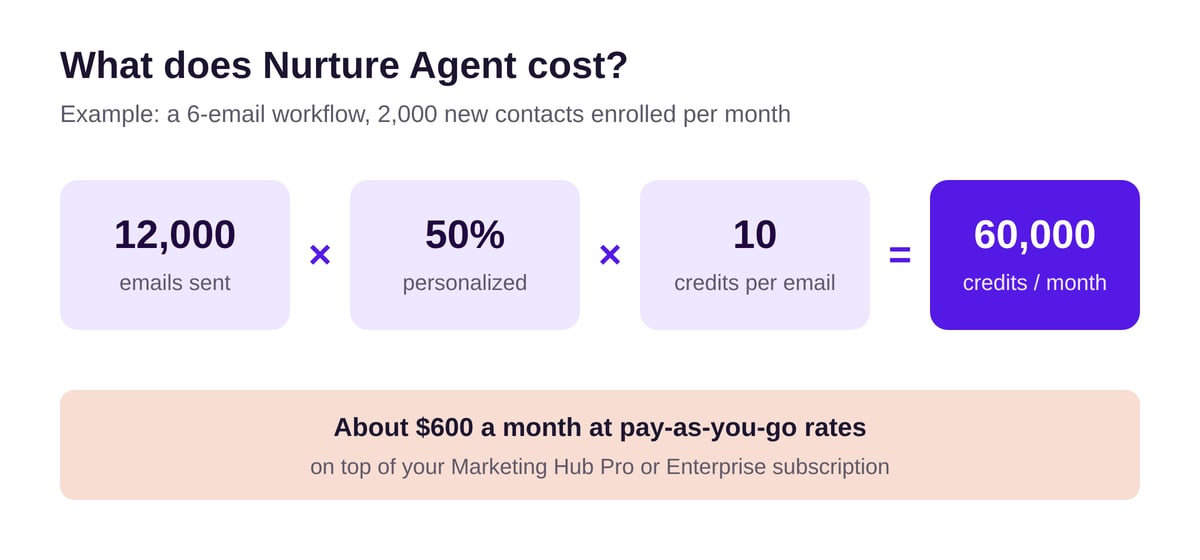
The result: about $600 a month for a single workflow, on top of your subscription. And you probably run more than one nurture.
Fortunately, HubSpot lets you set a credit limit specific to Nurture Agent. Once it's reached, the documentation says the original email goes out until the next month. Nothing breaks, personalization just pauses. Set that limit on day one.
5. How will you know it's working?
Back to that 50% slider. It's a free control group, and it's the most valuable part of the feature. Half your contacts get the original, the other half get the rewrite, and HubSpot provides a report comparing the two: deliveries, open rate, click rate.
The catch is that those metrics aren't enough. A catchier subject line lifts opens without moving pipeline. New Breed makes the same point: engagement alone shouldn't decide whether personalization works.
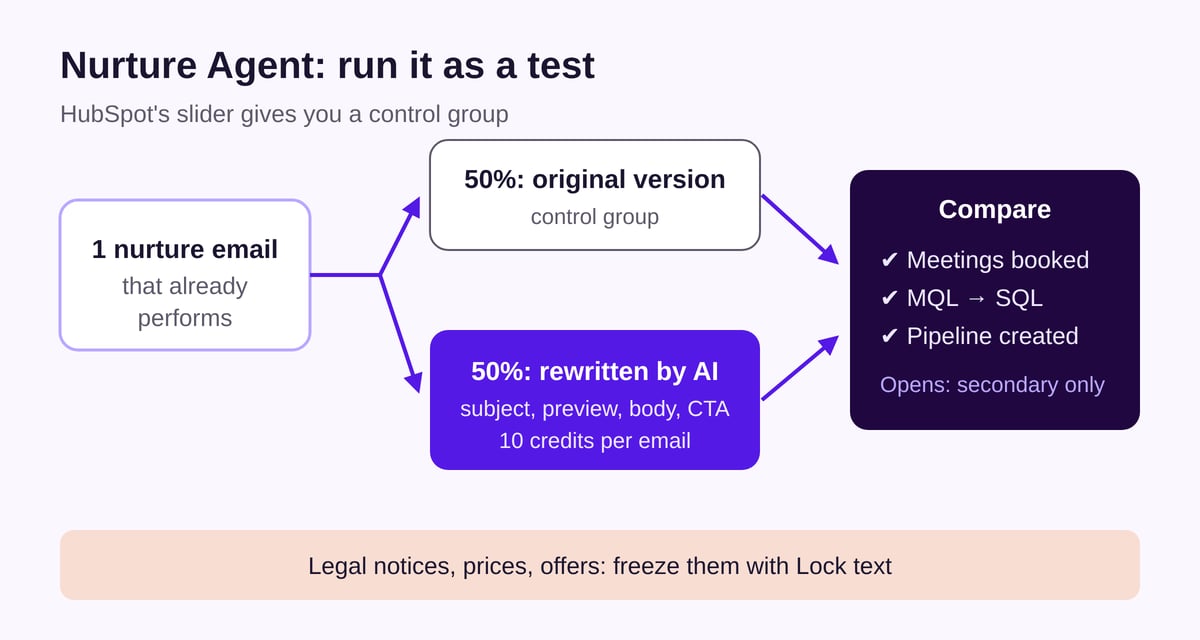
To judge the agent, compare both groups on what matters: meetings booked, MQL to SQL conversion, deals created. HubSpot lets you isolate recipients of the personalized version in the Recipients tab, which makes it easy to build two lists to track.
One last detail: individual sent versions can only be viewed for 30 days after sending. If you want to audit what the AI wrote to your prospects, do it weekly during the test.
What we recommend at if/else agency
Our take is simple: Nurture Agent is a good testing tool and a poor patch. At if/else agency, we never switch it on across every nurture at once during the beta. We go one email at a time:
- Audit the sequence and the CRM properties feeding the agent
- Pick an email that already performs, with enough volume
- Lock sensitive modules and set up brand voice
- Launch at 50% with a dedicated credit cap
- Decide after four to six weeks, based on meetings and pipeline
If the personalized version doesn't create more pipeline than the original, we turn it off and put the credits to better use elsewhere. This is exactly the kind of work we do in our CRM and marketing automation projects.
Summary
Nurture Agent delivers part of its promise: a different email for every contact, with no prompt to write. But it won't fix a poorly built sequence or neglected CRM data. And every personalized email has a price.
Run it as an experiment, one email at a time: keep the control group, set a credit cap and only reach a verdict once you've seen the pipeline numbers.
if/else tip: clean up your nurture before you hand it to AI.
Want to test Nurture Agent without burning through your credits? Let's talk.
Sources
- Personalize automated emails with nurture agent, HubSpot Knowledge Base, updated October 13, 2026
- HubSpot's Product & Services Catalog, HubSpot, accessed November 10, 2026
- Build demand with AI agents, HubSpot, accessed November 10, 2026
- HubSpot's Unbound 2026: The big announcements and updates, MarTech, October 16, 2026
- HubSpot Nurture Agent: How to Personalize Automated Emails at Scale, New Breed, October 16, 2026
- Cover photo by Le Vu on Unsplash