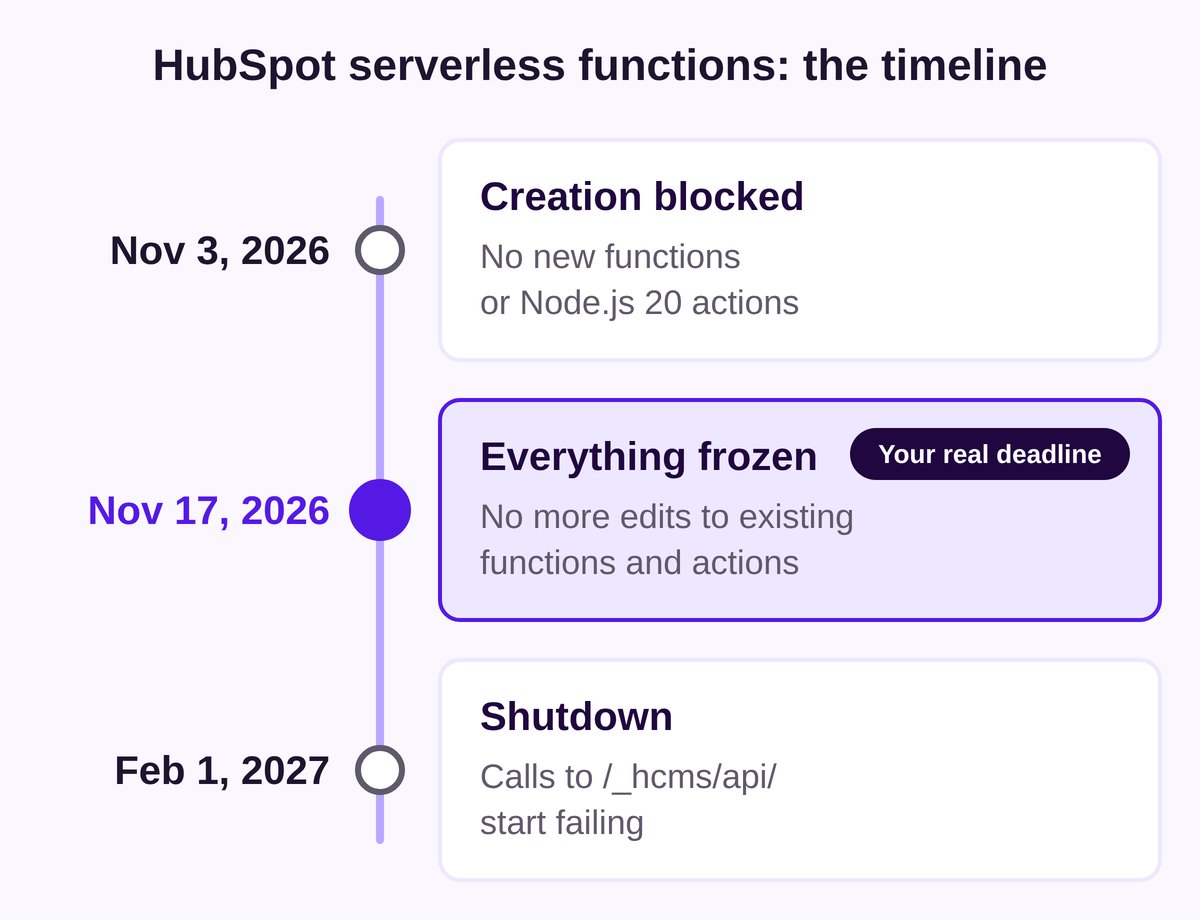
On November 3, 2026, HubSpot announced the end of serverless functions built in the design manager. On February 1, 2027, the ones still running will stop responding. Your quote calculator or the form that feeds your ERP could go down with them.
On paper, you have three months to migrate your HubSpot serverless functions. In reality, the date that matters is November 17: from then on, you won't be able to edit these functions or fix a single bug. And the real question isn't just "How do we migrate?" It's "Does this function deserve to survive?"
Here's the timeline, the three options for each of your HubSpot serverless functions, and the method we use at if/else agency to decide 👇🏼
HubSpot serverless functions: what stops, and when
According to the announcement on HubSpot's developer changelog, two things are going away at the same time: design manager serverless functions, served from /_hcms/api/ URLs, and Node.js 20 and earlier for workflow custom code actions. The reason: these runtimes no longer receive security updates, and HubSpot says it can't upgrade them itself.
- November 3, 2026: no new design manager functions, no new Node.js 20 actions
- November 17, 2026: existing functions and Node.js 20 actions can no longer be edited
- February 1, 2027: design manager functions stop running and calls to
/_hcms/api/fail
Who's affected? HubSpot's documentation points out that serverless functions require Content Hub Enterprise. Without that license, the first half of the announcement doesn't apply to you. Workflow custom code actions, on the other hand, show up in far more portals.
HubSpot won't migrate anything automatically. Each function has to be rebuilt in a developer project, under a new /hs/serverless/ URL, and every page, module or template that calls it has to be updated.
Why November 17 is your real deadline
After November 17, your functions keep running until February. But they're frozen. If a third-party API changes its format or a token expires, you can't touch the code anymore. You're left choosing between a broken function and a rushed migration.
Same story for workflows. A Node.js 20 action keeps running, but you can't save any change to it. And moving to Node.js 24 isn't a dropdown switch. According to HubSpot's upgrade guide, callback-style handlers are no longer supported, the request library is gone, and the HubSpot API client jumps from version 11 to version 13.
Put simply: the inventory can't wait until January.
Step zero: find every function you have
The classic trap: assuming you know where your functions are. HubSpot's migration guide lists the places where calls hide:
- templates, modules and theme settings
- header and footer HTML for the site, the blog and each page
- rich text and custom HTML modules
- external sites that call your portal
It also recommends checking calls on the live site, in the browser's Network tab, and reviewing each function's logs. Functions that already fail, for example because they rely on a retired API key, should be fixed or retired. Not copied over as they are.
Here's a typical case: a B2B manufacturing website with three functions. A quote calculator tied to a price grid, a form handler that sends leads to the ERP, and a connector to a webinar tool nobody has used in two years. The first two need migrating. The third should simply be deleted: migrating it would be wasted effort.
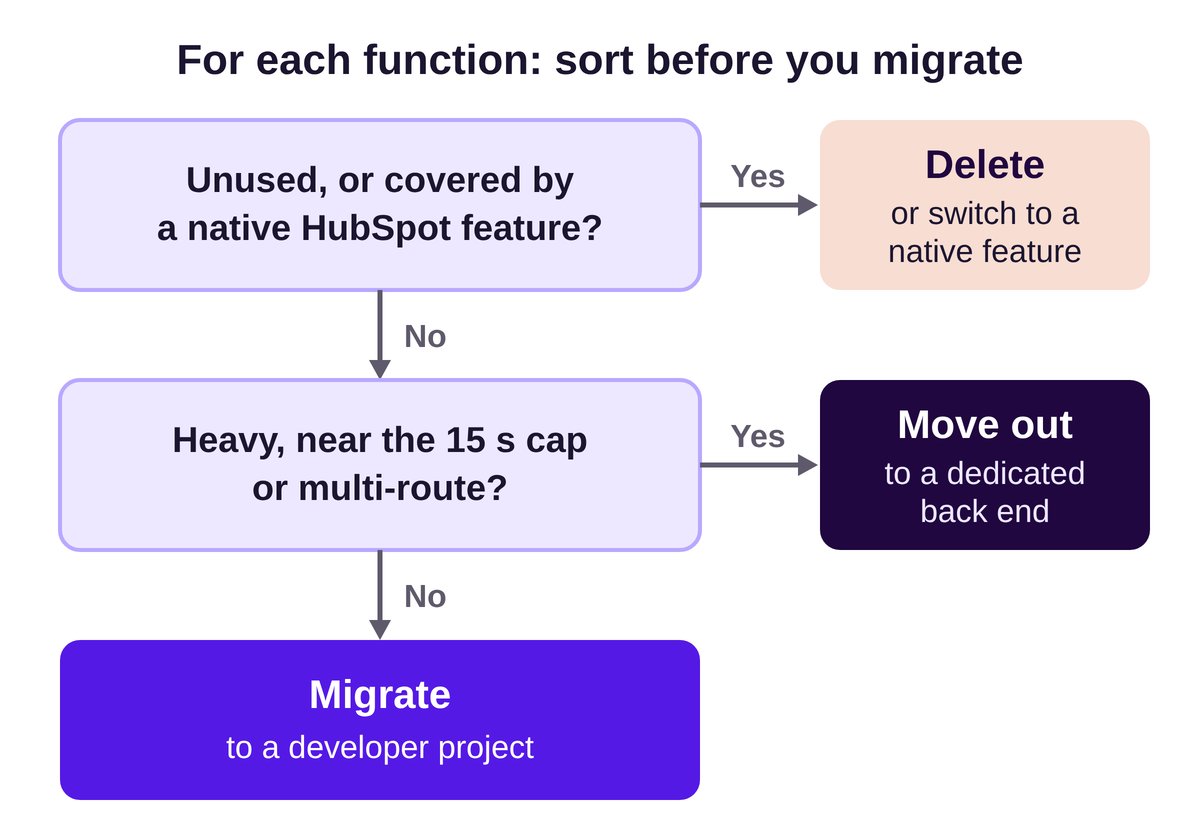
Three options for each serverless function
1. Migrate to a HubSpot developer project
This is HubSpot's intended route, and the right one for light tasks: hiding an API key or validating a form. Project functions run on Node.js 24 with platform versions 2026.03 and 2026.09, and get security patches automatically.
Copy and paste won't cut it. According to HubSpot's guide, the function signature changes, environment values become secrets, every dependency must be declared, and rate limit information is no longer provided, so you have to handle 429 errors yourself. The timeout goes from 10 to 15 seconds. Watch out: an endpoint goes public as soon as the project is deployed.
2. Move it to a dedicated back end
Our sorting rule: a function that gets close to the 15-second maximum allowed in projects, handles large volumes or chains several routes should move out of HubSpot. A small service on your own infrastructure or with a cloud provider gives you control over the runtime and the updates. That's what we already recommended in our article on API calls and the limits of HubSpot serverless functions.
The catch: someone has to maintain that server, or the problem comes back in two years.
3. Delete it or switch to a native feature
Some functions were written back when HubSpot couldn't do the job natively. Before migrating, check whether a native form, a workflow or a marketplace integration now covers the need. And a function nobody uses has to go.
Workflow custom code actions too
To find them, HubSpot suggests filtering your workflows by the "Custom code" action type, then opening each action to check its Node.js version. Save a copy of the current code outside HubSpot before you change anything.
Breeze can offer the Node.js 24 upgrade right in the workflow editor. HubSpot itself warns that it can make mistakes: compare its output with your saved copy and make sure every output is still returned.
One trap: testing an action actually applies its changes to the record you pick, according to the documentation. Test on a dummy contact or deal, never on a real customer.
What we recommend at if/else agency
- Before November 17: a full inventory of functions and code actions, with a copy of all the code outside HubSpot
- Sorting: migrate, move out or delete, one function at a time, with the business owner in the loop
- One switch at a time: identical requests sent to the old and new endpoints, then the URL change and a page-by-page check
- A tested rollback: we practice rolling back once after the first switch, as HubSpot recommends
We keep the same path after the prefix, so the website change comes down to replacing /_hcms/api/ with /hs/serverless/. And we document each project (endpoints and rollback steps) so the next person doesn't start from scratch.
HubSpot even provides a prompt for an AI coding agent that asks for approval before every live change. Handy for speed, as long as a developer reviews each step. If you're not sure what's running on your site, start with a technical audit of your HubSpot website. For functions that need rebuilding or moving out of HubSpot, our API integration and back-end services can take it from there.
Conclusion
The end of design manager serverless functions is a technical deadline with a clear schedule. It's also a good excuse to clean up the code running behind the scenes of your website.
The real risk is finding out in February that a form hasn't sent anything to your ERP for a week, with no error message.
if/else tip: do the inventory before November 17, even if you migrate in January.
Need help sorting and migrating your serverless functions? Let's talk.
Sources
- Sunsetting design manager serverless functions and older Node.js runtimes for custom code actions, HubSpot Developer Changelog, November 3, 2026 (updated November 4, 2026)
- Migrate design manager serverless functions to developer projects, HubSpot developer docs, accessed November 5, 2026
- Upgrade custom code actions to Node.js 24, HubSpot developer docs, accessed November 5, 2026
- Cover photo by Markus Spiske on Unsplash