On November 10, Google started rolling out its November 2026 core update. It's global, it covers every language, and it can take up to two weeks to finish. Rank trackers have been jumpy ever since.
When organic traffic moves, the instinct is to start editing pages right away. That's usually the worst thing you can do. If your site runs on HubSpot, you have a better option: the data to tell whether this Google core update is hitting your leads, or just your charts.
Here are 5 checks to run in your HubSpot portal, in the right order, so you can respond to the update without breaking what already works 👇🏼
The November 2026 Google core update: what was announced
The rollout began on November 10 at 10:06 a.m. Pacific time, according to Google's Search Status Dashboard. Search Engine Journal reports it's the third core update of the year, after March and May.
Google's own description fits in one sentence, posted on LinkedIn: a regular update designed to better surface relevant, satisfying content for searchers from all types of sites. No specific goal, no type of page singled out. Search Engine Roundtable notes that tracking tools were already showing volatility on November 9.
Should you worry? The shifts can be large. After the March 2026 core update, 79.5% of top-three URLs had changed position, based on SE Ranking data cited by PPC Land.
The problem is that you can't "fix" a core update the way you fix a bug. Google reassesses every page that answers a given query. If you slip, it's usually because other pages answer that query better.
1. Hold off on changes until early December
Google's documentation on core updates is clear: wait at least a full week after the rollout ends before you analyze your data. Then compare that week with the week before the rollout started.
On the 2026 calendar, that means a baseline week of November 3 to 9, a rollout running until around November 24, and a comparison week of November 25 to December 1. In other words, if the rollout does wrap up around November 24, you won't get a reliable read before December 2. If it runs longer, push your analysis back by the same amount. Google's Search Status Dashboard shows the actual end date.
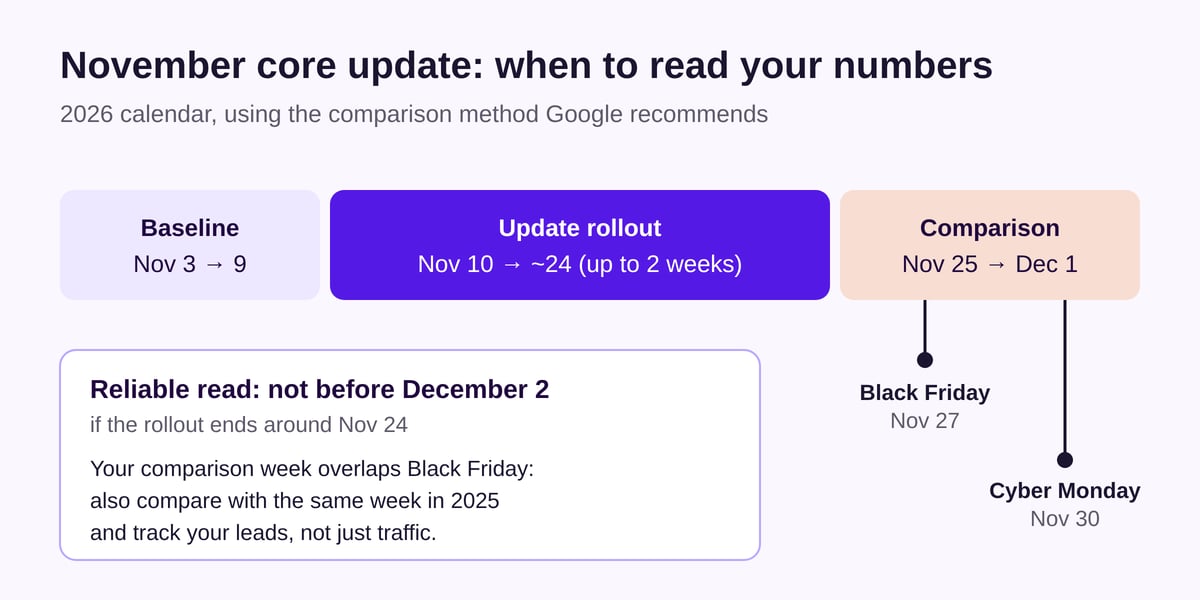
There's a catch. As PPC Land points out, that comparison week includes Black Friday (November 27) and Cyber Monday (November 30). Even in B2B, those days skew traffic. So also compare against the same week in 2025 to separate the update from the season.
At if/else agency, we freeze content changes on strategic pages for the whole rollout. The only exception is an urgent technical fix, like a page throwing an error or a form that no longer feeds the CRM.
2. Connect Google Search Console to HubSpot
If you haven't done it yet, now's the time. According to HubSpot's help docs, you set up the integration in your settings, under Integrations, then Connected Apps (labels may vary slightly in your account). It's available with Marketing Hub or Content Hub Professional or Enterprise, according to HubSpot's knowledge base.
Once it's connected, HubSpot's SEO tool (Marketing menu, SEO, Analyze tab) shows impressions, clicks, clickthrough rate and average position for each page. You can compare up to 10 pages side by side, filter by date range and export the data. Only sites verified in Search Console show up.
Do it now and you'll have a working dashboard on analysis day, instead of juggling three browser tabs.
3. Measure leads, not rankings
Search Console tells you how many clicks you lost. HubSpot can tell you how many contacts you lost. For your revenue, the second number is the one that counts.
In the Sources report of the traffic analytics tool, Organic search covers unpaid visits from search engines like Google, Bing and Yahoo. HubSpot also separates out an AI Referrals category for visits from assistants such as ChatGPT, Claude and Perplexity. Regular Google searches stay in Organic search.
On the CRM side, the Original Traffic Source contact property uses the same Organic search value, according to HubSpot's documentation. Filter the contacts created in each period by that value, then cross-check with the pages on your site that carry your forms.
Imagine this. A blog post loses 30% of its clicks but hasn't generated a single contact in six months. Meanwhile, your main service page drops two spots, and it brings in nearly half of your organic leads. Which one do you deal with first? Not the one making the most noise in your SEO tools.
To track these numbers without rebuilding them every week, our article on HubSpot dashboards for running your campaigns shows how to set them up.
4. Sort your pages by the size of the drop
Google's documentation separates two cases. A small drop, say from position 2 to 4, doesn't call for drastic action. Google even advises against changing content that's already performing well.
A big drop, say from position 4 to 29, calls for a proper review: the site as a whole, the pages hit hardest, and the pages that now rank above yours.
Cross that with what you measured in step 3.
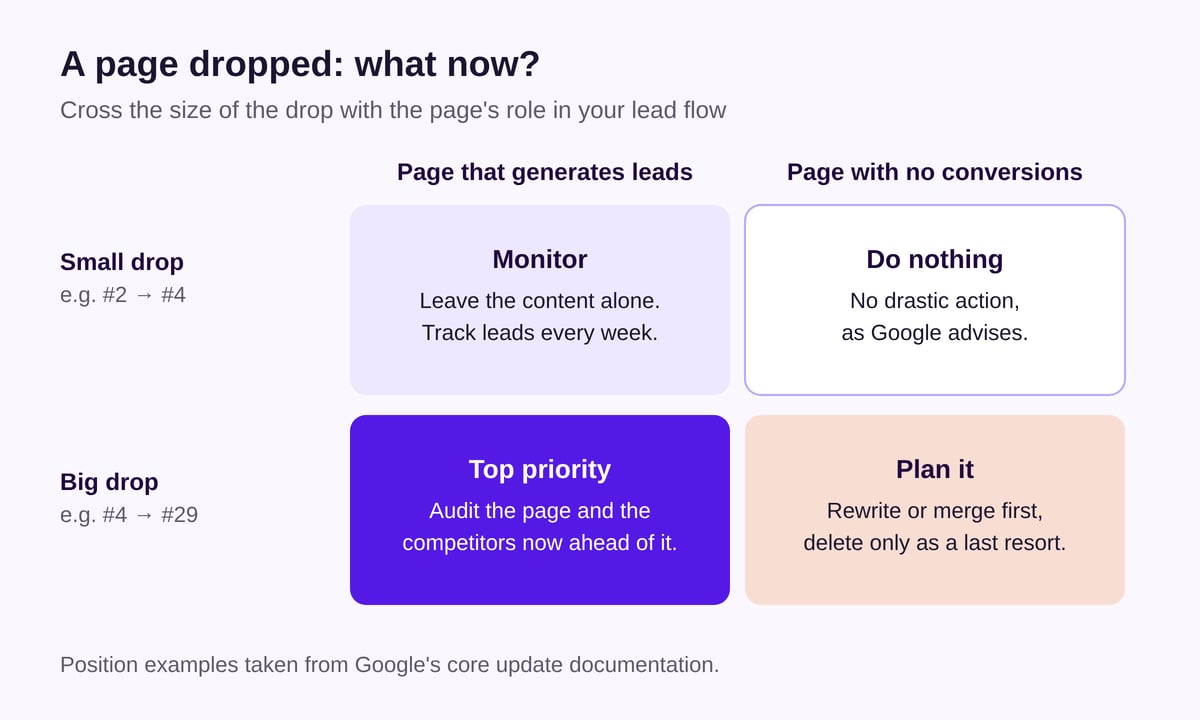
A page that generates leads and falls off a cliff is your top priority. A page with no conversions that slips two spots can wait, or stay exactly as it is.
5. Fix pages for readers, not for the algorithm
For pages that really did fall, Google warns against quick fixes. It recommends improving content over time and keeps deletion for sections built for search engines rather than people. It also warns that results can take several months to show, sometimes not until the next core update.
On a HubSpot site, this is what we recommend at if/else agency:
- Refresh what's there: figures, screenshots, dated offers
- Merge duplicates: two posts on one query, one 301 redirect
- Show expertise: a named author, examples from real projects
- Fix your templates: speed, mobile readability, working forms
That last one gets overlooked. A slow template or a confusing layout drags down every page built on it. Our guide to running a technical audit of a HubSpot website lists the checks to run. And if your templates are dated, you're looking at a HubSpot website rebuild rather than a content tweak.
Finally, keep in mind that organic traffic is now split between classic search engines and AI answers. We covered this in our article on SEO in the age of AI.
In summary
The November 2026 core update will move your rankings. That's normal, and it isn't necessarily bad news. What matters is the effect on your leads, and on that front HubSpot tells you more than a standalone SEO tool.
Wait until early December (December 2 if the rollout ends around November 24), compare like with like, and prioritize only the pages that keep your pipeline running.
if/else tip: after a core update, watch your organic contact count before your average position.
Has your organic traffic moved since November 10? Let's review your site together.
Sources
- November 2026 core update, Google Search Status Dashboard, November 10, 2026
- Google Search's core updates, Google Search Central, accessed November 12, 2026
- Google's November 2026 Core Update Starts Rolling Out, Search Engine Journal, November 10, 2026
- Google November 2026 Core Update Is Rolling Out, Search Engine Roundtable, November 10, 2026
- Google's core update may run until three days before Black Friday, PPC Land, November 11, 2026
- Analyze SEO performance, HubSpot Knowledge Base, updated June 20, 2026
- Understand HubSpot's traffic sources in the traffic analytics tool, HubSpot Knowledge Base, updated August 1, 2026
- Understand Original and Latest traffic source properties, HubSpot Knowledge Base, updated August 4, 2026
- Cover photo by Stephen Phillips - Hostreviews.co.uk on Unsplash